
Vercel released eve (opens in new tab) today: an open-source agent framework for building and running AI agents. The difference from traditional agent orchestration frameworks is that building an agent on eve is closer to writing up markdown than to wiring up a proprietary workflow engine. That keeps your attention on what you want out of the agent instead of the semantics of the framework running it.
Having built Satoru, a background coding agent, we know a couple of things about what it takes to build an agent. However, it's gone awfully quiet now after all of those "agents pushed 110% of all our code to production" stories. Being the cynical folks, here's the honest version. It's worth building these agents yourself to understand how they work. In practice, though, you'll probably reach for a managed service like Vercel AI Gateway. The models move so fast that unless agents are your primary income, you'll spend more time maintaining one than you ever claw back in productivity.
So fast forward to today, when eve landed, we rebuilt a bunch of our internal agents on it to see what the framework actually removes. This post is two things: a tour of what eve gives you, and a detailed walk through the agents we built, every tool, skill, connection, and guardrail.
What eve actually is
The headline idea is that an agent is a directory of TypeScript and Markdown files, and where you put a file is how it gets wired in. Vercel compares it to what Next.js did for web apps, and I'd say that's pretty accurate, but I'd argue it's even simpler.
You describe behaviour, eve owns the execution loop. Notice how many of the files below are written in Markdown.
Meet the primitives
agent.tssets the model (with provider fallback).instructions.mdis the system prompt.tools/holds TypeScript files that become callable tools.skills/holds Markdown files that become procedural knowledge the agent pulls in on demand.channels/route the same agent to Slack, Discord, Teams, Telegram, GitHub, Linear, or plain HTTP, one adapter file each.connections/wire in external services through MCP and OpenAPI, with credentials handled for you.schedules/turn cron expressions into autonomous runs.evals/are scored test suites for the agent's behaviour.
Underneath the files, eve ships the things you'd otherwise build yourself: durable execution with checkpointed workflows, so a session survives a crash or a deploy and resumes from its last checkpoint; isolated sandboxes for agent-generated code; human-in-the-loop approval gates you can set per tool; OpenTelemetry tracing you can read in Vercel's Agent Runs dashboard; and replay, so you can see the exact model calls, tool invocations, and commands a run made. It's basically Vercel Sandbox (opens in new tab), Vercel Workflows (opens in new tab), and the Vercel AI SDK (opens in new tab) rolled together, but far less fiddly to get started with.
The files and what they're used for
The primitives above land better against something real, so the rest of this section is a file-by-file teardown of one agent we built and run: the one that keeps our CMS comparison pages factually fresh. Each file maps to a primitive, and seeing them wired into a working agent beats reading them in the abstract.
A note on scope first. The version in our repo is a single directory carrying two skills, cms-freshness and daily-retro. In production we've split those into separate bots (the full fleet is in "How our bots work" below), but we've kept them together here because one agent doing two jobs exercises more of eve's surface in a single read. We'll start at the model config and work outward: the instructions, then the tools, channels, connections, and schedules.
agent.ts the entire model config
Here is the complete agent definition.
That's it. The model string routes through Vercel's AI Gateway, so the provider is swappable and eve handles fallback. For this kind of work you probably want a high model, so we run the strongest Opus available. The job reads as mechanical, find a stale fact, cite a source, propose a patch, but the judgment underneath isn't: deciding whether a vendor genuinely shipped a feature, or whether a criticism we made still holds. That's where a weaker model gets those calls wrong. The guardrails we get to later can block an unsafe edit, but they can't tell you a well-sourced, subtly wrong one is wrong. So we spend on capability up front.
instructions.md the system prompt as a file
instructions.md is the agent's identity and its rules. Ours is short and blunt. It names the two skills, then sets hard scope:
- Every analytics, search-console, and ranking query is scoped to robotostudio.com. Never a client's data, even if a connected server happens to expose it.
- Nothing outside
apps/web/content/cms/*.yamlgets edited. Branches, commits, and PRs belong to the freshness skill alone. - One Slack channel is the only outbound path. No DMs, no other channels.
It also sets tone, including a rule we apply everywhere: no em-dashes, use periods, colons, commas, or middots instead. The system prompt is a file in the repo, so it's reviewed in pull requests like any other code.
skills/ Markdown that teaches a procedure
In eve, a skill is a Markdown file of domain knowledge the agent loads when it's relevant. Ours has two, and they carry most of the real thinking.
The cms-freshness skill opens with editorial guardrails before a single step. These are opinionated comparison pages with a deliberately skeptical voice, so the rules are protective: patch facts, not tone, and treat vendor copy as proof a feature shipped but never as proof a weakness is gone. A changelog shows a feature exists. It does not show the pain point is fixed. For that you need an independent source.
Then it lays out a research order with a fetch budget of roughly ten URLs: the pricing page first, then changelog, then official blog, then the vendor's community forum, then Reddit, then Hacker News. The comments on the last two are where real developer sentiment lives, and the rule is to treat themes as signal and one-off complaints as noise.
The daily-retro skill is the opposite temperament: deterministic and rigid. It pins everything to a single UTC day, pulls a fixed set of PostHog queries, makes exactly one Ahrefs call (with a list of the gotchas that crash the run if you ignore them), and renders a Slack report with a fixed Block Kit shape. It even tells the agent to discover real event names first rather than assume form_submit exists, because our actual events are named things like contact_form_viewed and cal_booking_successful.
tools/ capabilities as typed functions
Tools are TypeScript files using defineTool with a Zod input schema and an execute function. We wrote eight. The simple ones first:
pick_stale_cmslists everyapps/web/content/cms/*.yamlthrough the GitHub API and returns the one with the oldestupdatedAt. This is how the agent decides what to work on with no input.read_cms_yamlreads and parses one file by slug.fetch_urlfetches a page and runs it through Turndown to return clean Markdown, stripping scripts and styles, capping at 60,000 characters, with a 15-second timeout. It's how the agent reads a vendor pricing page.search_redditandsearch_hackernewshit the public JSON and Algolia APIs, no auth needed, to gather developer sentiment with a citable permalink on every hit.compute_target_dateresolves the retro's target day, defaulting to yesterday in UTC, and returns the trailing-seven-day window so "versus average" means the prior seven full calendar days, not a rolling clock.post-to-slackposts to the one configured channel throughchat.postMessage, pulling the token at runtime via Vercel Connect.
The eighth tool, open_pr, is where it gets interesting, because letting a model edit published content is exactly the kind of thing that scares the shit out of your Infosec team. So we put a wall in front of it. That wall is the guardrail engine, the part that does the real work, and we come back to it in the patterns section below.
channels/ doors in
channels/slack.ts is one file, and it's most of what makes the agent answer in Slack. It uses eve's Slack channel with credentials from Vercel Connect, and an onAppMention handler that maps the Slack user who mentioned the bot to an auth principal. Want it answering in Linear too? That's another short file of about the same length, and the agent itself doesn't change.
connections/ services out
connections/ is how the agent reaches Ahrefs and PostHog. Each is a defineMcpClientConnection pointing at a remote MCP server, with the token pulled from an environment variable at call time and a description that scopes it hard.
Two things to notice. The credential never sits in the agent logic, and the scope ("robotostudio.com only, never another domain") lives right next to the connection so the model reads it every time it considers a call.
schedules/ cron as a Markdown file
The freshness job is a single file, schedules/cms-freshness.md:
Every Monday at 09:00 UTC, eve runs the text below as the agent's prompt. The cron line is the only configuration the schedule needs.
How our bots work
We also recorded a walkthrough of this running on our own site: the comparison-page updates, the Slack reports, and how the cron jobs orchestrate more than one agent.
Loading video player…
The agent you just read end to end is our content-ops bot, and it's the ancestor of most of the agents we run. The job we walked file by file is the CMS comparison updater: a weekly cron finds the stalest comparison page, researches that vendor against primary sources, and opens a single sourced PR for a human to merge. The guardrail pattern below is how it stays honest about what it changes.
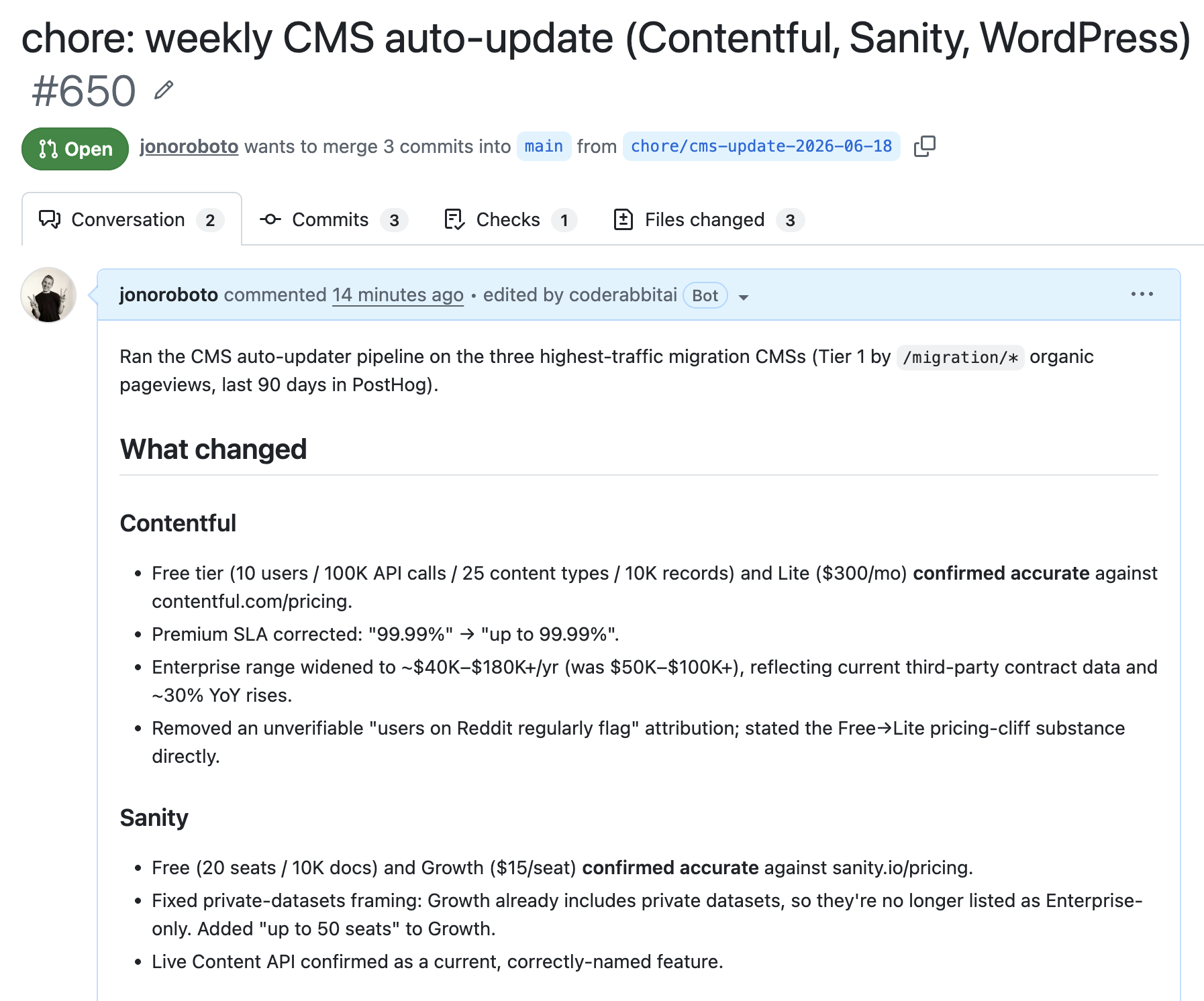
None of our bots writes prose for the blog. We deliberately didn't build a ghost-writer, because the defensible work in content operations is keeping facts true and surfacing what's worth acting on, not generating words at volume.
The PostHog feedback loop
This one fires the moment someone converts, a Cal.com booking or a Formspark submission, and reconstructs the whole path that led there. A typical read: a visitor landed on a blog post, moved through to our Sanity services page, then converted by telling us they needed a Sanity rebuild. That last part, the stated intent, is the bit a conversion counter never hands you. It turns a number ticking up into a sentence we can actually plan around.
I can't show you this one. It's built from a real visitor's name and the thing they told us they needed, and I'm not about to dox a prospect to decorate a blog post. So you'll have to take my word for it, which I'm aware is exactly what someone with no screenshot would say. If you'd rather see it for real, fill in the contact form and become the example. That submission fires this exact agent, and we'll gladly walk you through your own path across the site on a call: the post you landed on, and what you read before you decided to message us.
The Ahrefs weekly audit
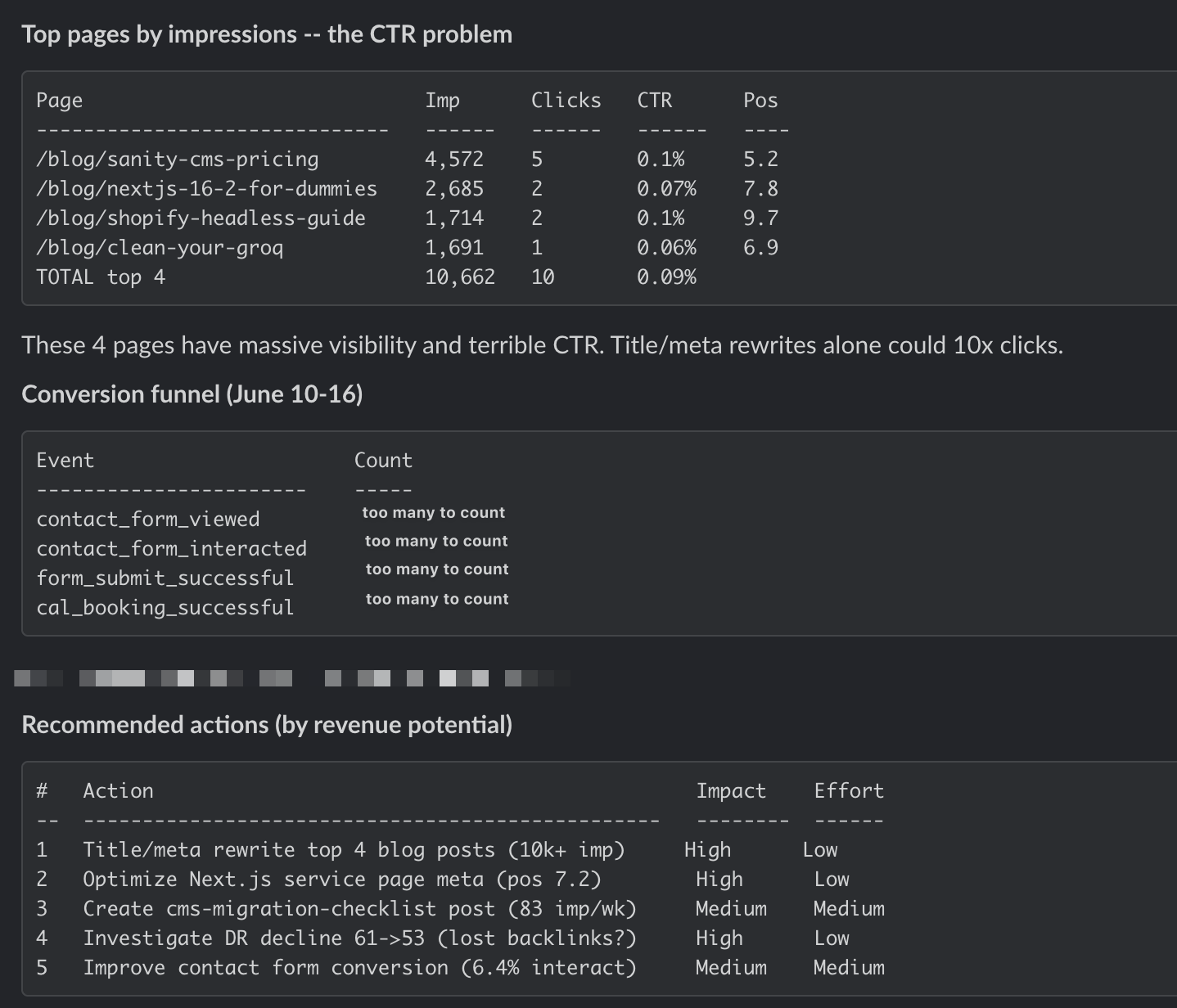
Once a week this agent reports the movers and shakers across the keywords we're chasing. When we rework a cluster of posts to build authority on a subject, it shows whether that work is moving rankings week over week, and how the queries we surface for are spreading and fanning out across the niche. It tells us whether an authority push is compounding into real rankings or just adding posts to the pile, and where our reach is heading next.
A recent run flagged four posts pulling big impressions and almost no clicks, then handed back a ranked to-do list to fix it.
The bookmarks bot
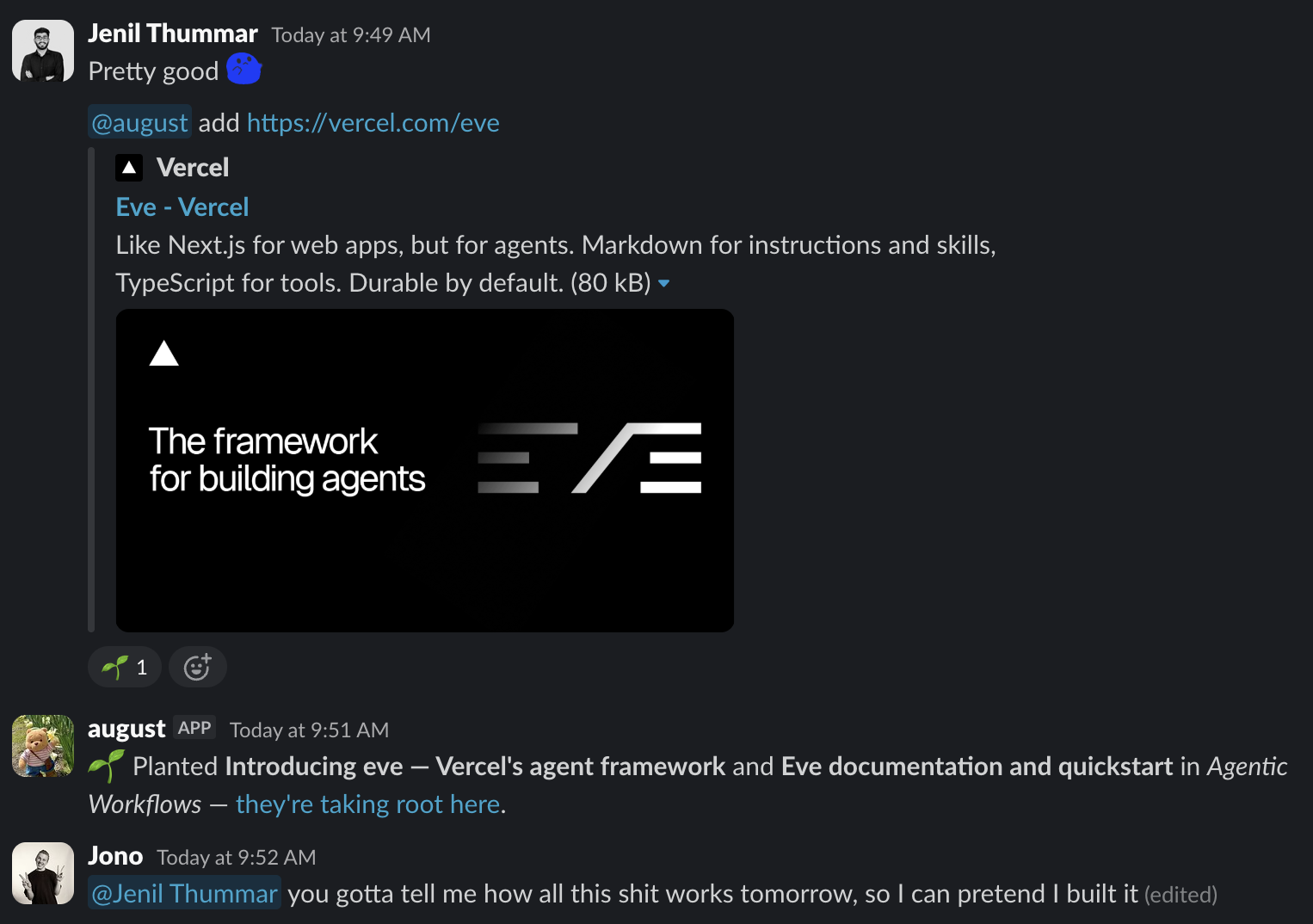
We keep a #bookmarks channel in Slack. Drop a link in it and this agent immediately pulls the content, files it into our Are.na (opens in new tab) knowledge bank, and tags it automatically. From there you can enrich any entry just by talking to the bot in the channel, with its credentials brokered through Vercel Connect (opens in new tab) rather than sitting in the agent. Are.na handles the storage for now. We like how simple it keeps things, and we may bring it in-house later.
Below, it files away eve's own launch link, complete with the obligatory gardening metaphor.
The Linear client digest
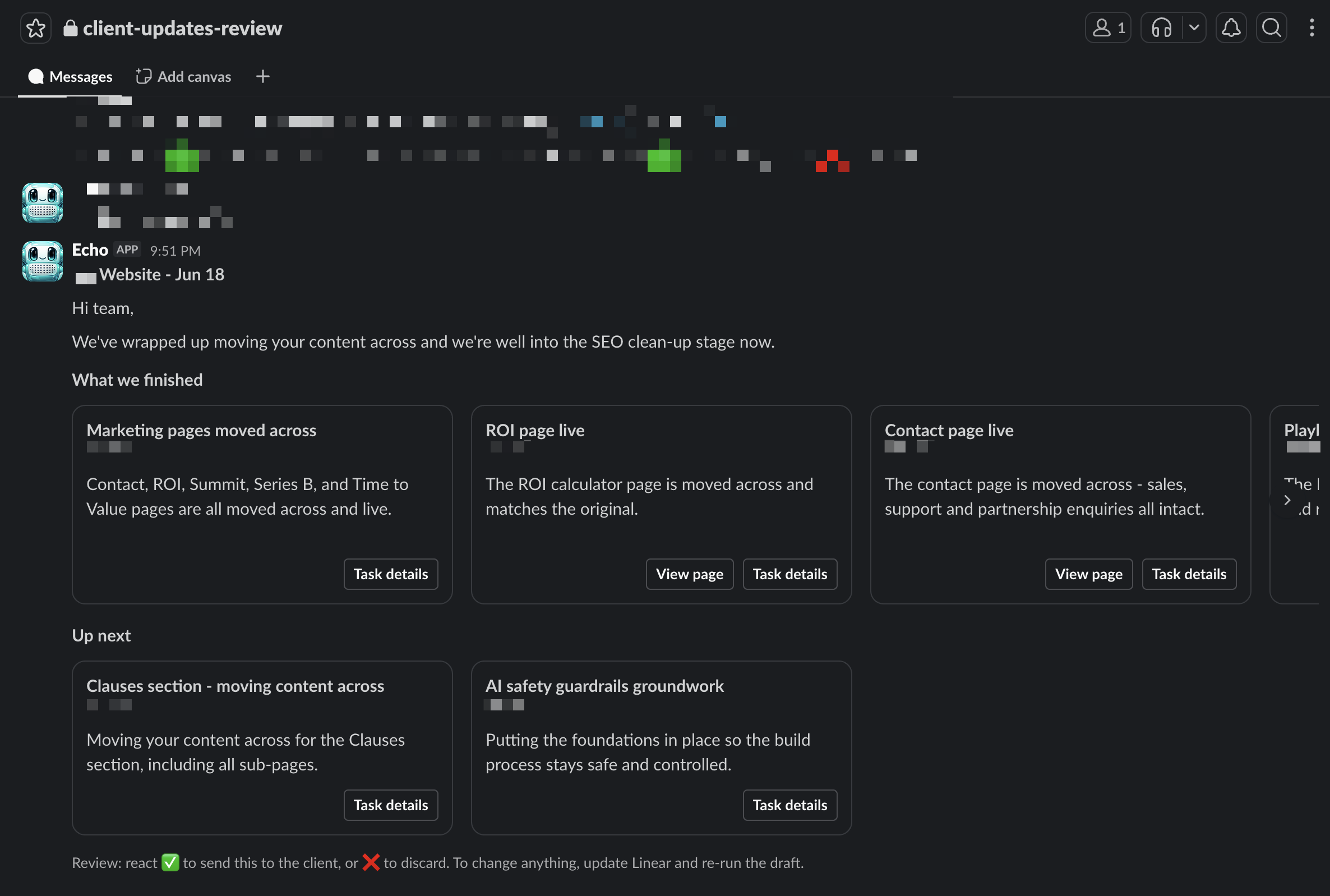
Linear's stock Slack notifications spam you every time a ticket slides into Done. This agent, forked from Vercel Labs' personal-agent-template (opens in new tab) and stripped back to what we needed, replaces that firehose with a single contextual, directional update at the end of each day. The draft lands in an internal review channel first, where a teammate approves or discards it before it reaches the client. A client can read it in a few seconds and know what shipped and what's coming next.
Below is a draft waiting on that approval, with the finished and up-next work pulled straight from the Linear tickets.
Patterns, anti-patterns, and what tripped us up
A few things we learned the hard way, building on a framework this young.
The dev loop is a conversation
The first time I ran eve dev, I went looking for the Next.js moment. npm run dev, a server boots, you open localhost, you watch the thing you're building. I waited for the equivalent and it never came. eve just drops you into a TUI, a chat in your terminal. I'd say it took a second to click, but it took far longer, and then it was obvious: the thing you're building is a conversation, so you develop it by having one. Where Next.js hands you a page to poke at, eve hands you the agent to talk to.
Guardrails the model can't override
The pattern that did the most work for us: never let the model write anything published directly. Our comparison updater doesn't edit YAML. It emits structured findings, and a deterministic engine in lib/ decides which ones get through. Every proposed edit declares its exact from → to change and the source that justifies it, then runs a few gates before a character is written. A vendor primary source can admit a change alone, community chatter is a lead and never admits on its own, a claim that contradicts the vendor needs two independent sources, and the rebuilt diff has to match what the model declared or the finding is thrown out.
The point generalises past CMS pages. If you want a model touching anything you've published, don't ask it to be careful. Make carelessness structurally impossible and let the deterministic layer reject everything it can't prove.
Reaching for primitives you don't need
eve's sandboxes are one of its headline features, and we don't use one. Our agent reads pages, queries APIs, and commits through REST. It never writes or runs code, so there's nothing to isolate. Satoru, our background coding agent, is the opposite: it clones repos and executes code, which is exactly what a sandbox is for. The anti-pattern is provisioning the heavy primitive because it's in the brochure. eve lets you reach for it only when the job demands it, and our content agent simply doesn't.
Schedules can't park for a subagent
Scheduled work has a sharp edge. A schedule running in task mode can't park to call a subagent: it dies with Cannot park: no continuation token, and nothing in the type signature warns you first. Keep that work inline, or move it to the handler form.
Pin the build to the docs
eve is days old, so the model has no useful priors. Left alone it drifts toward whatever it saw most in training, which here is the wrong thing: older agent libraries, stale APIs, patterns eve threw out. You can vibe-code an agent, but only with a tight set of requirements. Two habits did most of the work. We put every spec through a grill-with-docs (opens in new tab) pass so each requirement was pinned to the real documentation before any code existed, and we pointed the coding harness straight at eve.dev/docs (opens in new tab) and made it read the current source rather than guess. Skip that, and the model will happily build against an eve that doesn't exist.
Where this leaves us
The honest status: all five of these run in production, and we keep upgrading them piecemeal as each one shows us a new way to be wrong. We've kept this writeup qualitative on purpose. Screenshotting a dashboard to prove an agent earns its keep is its own kind of slop, and the guardrail engine is the part actually worth showing.
What's already clear is the shape of the saving. Satoru needed a control plane, a queue, a sandbox orchestrator, and a streaming dashboard before it did anything useful. This agent is a folder: a four-line model config, two Markdown skills, eight tools, two connections, one channel, one schedule, and a guardrail library. eve absorbed everything that used to be bespoke infrastructure, and left us with the part that's actually ours, the rules.
The content agent is one of several agentic workflows we run in production, and they ride on the same fast, type-safe agentic websites we build for clients. Same stack, two ends of the same job.
No spam, only good stuff
Subscribe, for more hot takes