

Introduction
We're going to let you in on a little secret. I think the days of building a website, completely from scratch, are numbered. I think, in fact I know, we're going to see a shift. Similar to what we've seen with frameworks taking away the need to write raw HTML, I think we're going to see the best development houses move towards a system where they can build websites using components and scaffold the fundamental routing. It's something we've done for the past few years at Roboto Studio, and I'm going to let you into another secret... We use AI extensively. Oh, that wasn't really a secret, was it?
Give me the cliff-notes, I'm not going to read this whole thing anyway?
Okay, cool, go use Next.js, Tailwind CSS, Shadcn/ui, v0, and then you can pretty much build things like wildfire. But stay tuned for the rest of the post, because I'm going to show you how we're using all of these tools to deliver projects that are not just good, but downright extraordinary.
Vercel also had us on their first ever community session to talk through this exact workflow, with real examples: an investment firm site and a financial calculator, built without touching a traditional design tool.
Loading video player…
What is v0?
Oh did I get your attention? I'm sorry. v0 is the new tool, from the folks at Vercel. It essentially acts like a chatGPT interface for generating user interfaces. That's really underselling it though because it's a tool that can take your idea all the way through to a production-ready component. I'm serious, we've built the foundations for an entire website with this tool, and spent the time we would have spent on manually implementing the components on actually building new and innovative things.
The real beauty is that it goes beyond Next.js, Tailwind CSS, Shadcn/ui. It's able to pull in libraries, but anything it builds is accessible by default, and where possible server-side rendered if it suits. So you can actually rely on it to build things like charts, or even entire pages, and it'll be accessible and performant.
How does it fit in your workflow?
Well, we've got a few different stages that it's pretty much removed days of work from. I'm not joking.
Ideation
In the old days, we'd typically sit down with the client and discuss the requirements. We'd scribble down some sketches, bounce around some ideas and then start to form a picture of what the website was going to look like. We'd then go back to the office and start to put together a plan. All in all, this process takes a good few days and involves several people.
Now, we start with the same conversation but we use v0 to bounce around ideas. We'd actually build it right there and then with them, rule out ideas that aren't going to work and refine the ones that are. This process, while still requiring a human to some extent, is a fraction of the time it used to take.
Prototyping
Multi-step forms? Mortgage calculators? Chat interfaces? You're shifting away from meticulously wireframing this inside of figma, manually dragging prototype components together. No, you're using v0 to generate the structure, and then you're using the component to build out the interactive prototype. This is where the true magic of v0 happens. You can generate entire user journeys, complete with custom logic - not the same bullshit where you end up having to make 4 different artboards to show success, failure, validation and hover states. No, you can just generate it all, and the kicker - it's accessible by default, so we don't even have to think about those states.
Implementation
At this point you're actually taking the prototype and pulling in real-world data. For example a recent one was involving pointing a form into a real-world Formspark API, to see if multi-step forms actually worked. They did, and more impressively still, v0 actually one-shotted it.
The fact that you can pull in a damn good range of libraries and frameworks from elsewhere is a huge boon. Hell, we might even give away which website was built with v0 by saying "Wow, matter.js is so cool, I wonder if we can make it rain objects?".
Let's talk design tokens
If you're not familiar with design tokens, they're a way of standardising design decisions across a website. Instead of having to manually set colors, font sizes, and spacing, you can use design tokens to ensure consistency. If you're already using Tailwind CSS or shadcn/ui, you're already using design tokens. It's also how we hand over brand design work: tokens the site consumes on day one rather than a PDF.
It's important because it actually takes decisions away from having to be made on a per-item basis. If you've ever asked your designer what hex code we use for the hover state and their response was "What hover state? Just a transparency on it", you've experienced the pain of not having design tokens.
We actually recommend a really nice tool from Simeon Griggs called tints.dev (opens in new tab). This helps you to design accessible color palettes, and then you can just use the tokens in your code.
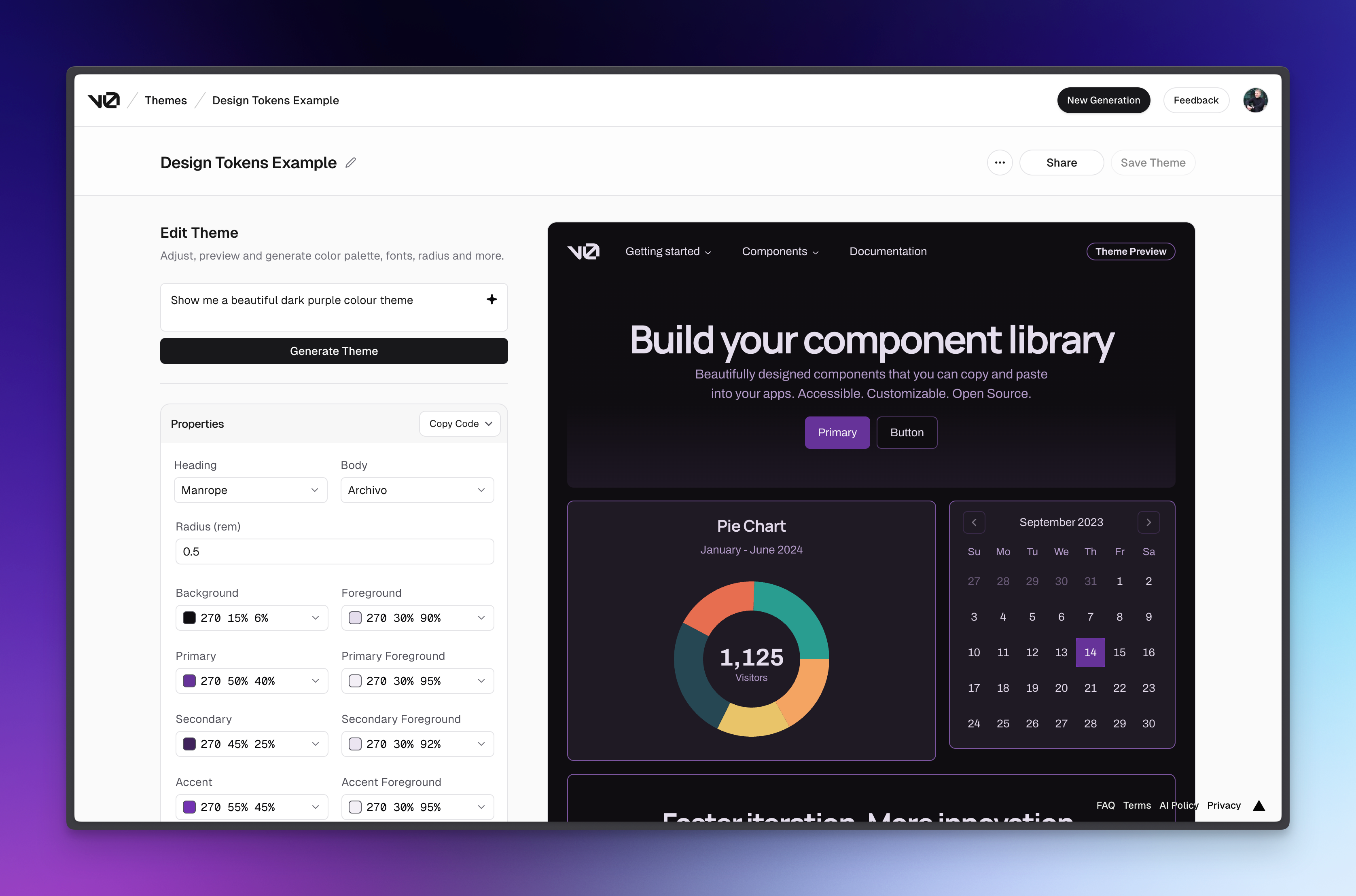
**Pro tip: **go and use the old v0 theme builder (opens in new tab), and feed these design tokens into the generation of v0 UI to get a more custom-looking interface.
No spam, only good stuff
Subscribe, for more hot takes


What importance do these have in relation to v0?
Well, my expectation is that at some point there's going to be a shift towards storing these design tokens as a remote env token that can be pulled into your v0 prompts, your local cursor ai, and anything else that needs it. I think instead of having disparate tools, that each have their own variables or tailwind config, you'll just have one source of truth.
My guess will be at some point, v0 will get something similar to this, and we're going to really kick it up a notch with getting generative UI that looks exactly like the designers website. Hell, we may even be able to rip it straight from the website itself. Man, just writing this, is making me think we should build a scraper tool for this.
Okay, let's dispel some myths
Well, I'll keep it simple. I think you're literally missing out as a client or as an agency not utilising AI in web development.
But surely you're paying money for old rope if the AI is just going to write the code for you? No, you're not. What you're getting is the equivalent of a forklift. It takes away menial tasks as a developer and frees up your time to focus on more complex problems. Why would you ask a builder not to use a wheelbarrow when they're transporting bricks? You've got to do it manually one brick at a time.
What do we spend our new found time on?
More user testing, for a start. When component assembly stops eating the budget, we can dig into how people actually use the site and build the UX details that normally get cut: better empty states, faster search, interfaces that make sense on the first visit.
Performance gets the same treatment. Caching strategy, asset optimization, and the fine-tuning that keeps load times quick on a mid-range phone, not just a dev machine. v0 gives you a decent accessibility baseline out of the box, and the saved hours go into pushing past it rather than scrambling to meet it.
The rest of the time lands on work clients can feel: custom features like site search or bespoke e-commerce flows, proper security testing, content strategy and SEO that's grounded in what their audience searches for, and enough training that the team we hand over to can run the site without ringing us every week.
The future
If you haven't guessed it already, you're going to see a night-and-day shift between agencies that are embracing AI and those that aren't. If you aren't already generating internal content that can be used for training data for AI, you're already behind. It's going to create a flywheel effect, and those that get on board will be able to deliver websites that are not just good, but downright extraordinary.
If you're trying to position your clients or your agency for the future we would highly advise you start looking to migrate over to Tailwind CSS, as the first step. From that point implementing shadcn/ui, and then finally looking to v0 as the next step. If you're looking to do this migration, we're more than happy to help - just drop us a message. There's some strategies we've developed that can make the process easier.